

For slot fans who value privacy, the classic Thunderstruck 2 slot comes with a excellent solution: a silent mode. This function lets you dive into its Norse mythology theme without making a sound. Let’s explore how to play Thunderstruck 2 silently, explaining how it works, why it’s useful, and what makes library-quiet gaming in Canada so popular.
Contrasting Silent Play Across Different Slots
Some slots function more successfully than others with no audio. Many new video slots depend on audio narration and theme music to pull you in. Thunderstruck 2 stands out because its visual design is comprehensive and self-sufficient. Every piece of information you need is displayed on the screen in a neat, readable way.
If you’re looking at other slots for quiet play, check for clear visual win alerts, easy-to-understand bonus round progress bars, and detailed information panels. Thunderstruck 2 establishes a benchmark here. Its interface is still a template of player-friendly design that works perfectly with or without audio.
Optimizing Your Silent Thunderstruck 2 Gameplay
To have a sound-off session completely, adjust your approach a little https://thunderstruck2.ca. Without audio cues, hold your focus on the reels. Take time to examine the game’s paytable and help screens first. Grasp what each symbol pays and how each bonus feature works before you start betting.
Utilize the moment to appreciate the game’s art. Observe closely at the character symbols, view the animation when Thor’s hammer lands on the reels, and spot the lightning flash during the Wildstorm feature. This transforms your session from simple gambling into an interactive visual story.
Setup for Optimal Play
Configure your screen’s brightness and contrast to a comfortable level to prevent eye strain during long quiet sessions. On a phone or tablet, consider using a blue light filter in the evening. Note, a stable internet connection is still essential. Silent mode affects nothing about the game’s random number generator or performance, just the audio.
Get to know the autoplay functions by visual. Establish a loss limit or a single win limit, then see the reels spin on their own. All wins and feature triggers are highlighted on screen. This hands-free method operates beautifully with a quiet, watchful style of play.
Perks of Gaming Without Sound
Playing without sound has several perks beyond just being polite. It boosts concentration, since repeating audio or sudden win sounds won’t break your focus. This is especially valuable if you’re trying out a betting system, as you can concentrate fully on the game’s systems and how often features trigger.
On a practical level, it saves your device’s battery because rendering sound uses extra power. It also lets you multitask. You can enjoy your personal playlist, tune into a podcast, or even have a quiet chat while the reels rotate. This flexibility makes it easier to integrate gaming into your day.
- Enhanced Focus: Eliminates sound distractions so you can follow the game’s rhythm better.
- Stealthy Gaming: Enjoy gaming anywhere without anyone realizing.
- Power Preservation: Prolongs mobile device battery for extended play sessions.
- Personalized Sound Options: Pair the game’s graphics with your own songs or podcasts.
- Less Sensory Overload: Produces a more relaxed, less intense gaming atmosphere.
Thunderstruck 2 Gameplay Features under the Spotlight
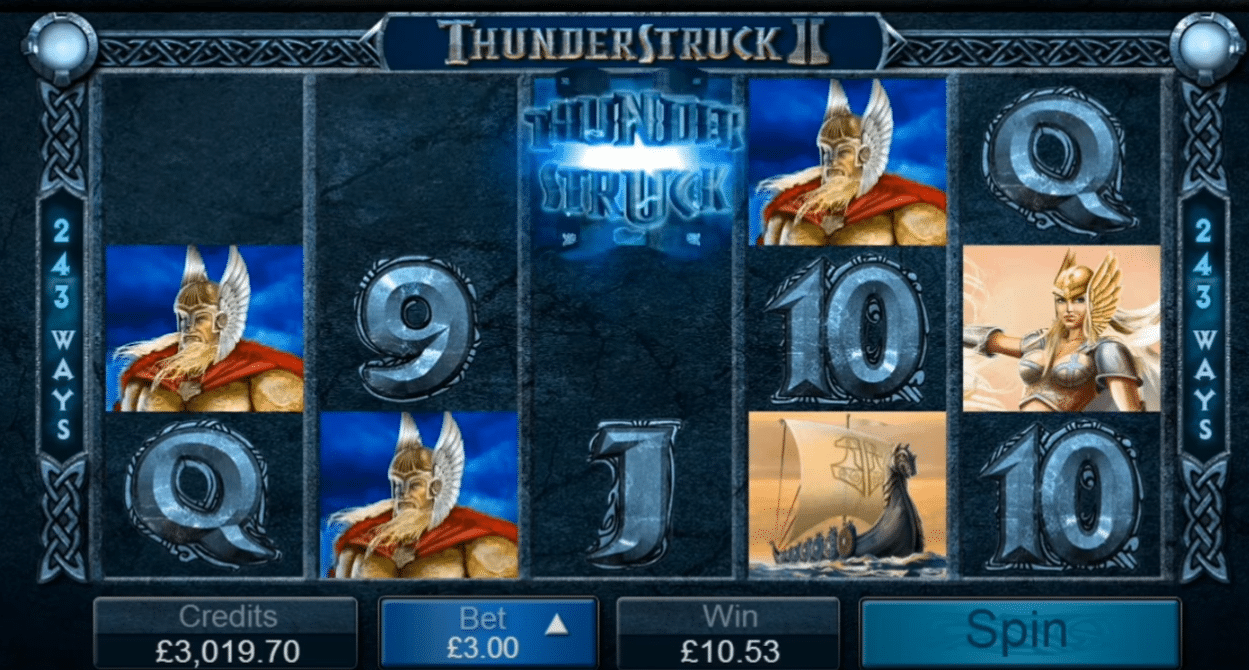
With the sound muted, Thunderstruck 2’s clever design becomes more obvious. The 243-ways-to-win system maintains visual activity on the screen, with wins lighting up across the grid. The Wild symbol (the game logo) substitutes and shows a distinct visual change, and the Thor’s Hammer feature is clearly visible when the hammer graphic turns whole reels wild.
The highlight is the Great Hall of Spins, a visual adventure. Landing three or more bonus symbols triggers an entry sequence. You then choose from doors to access one of the four free spin modes. Each mode has its own visual style and special wild feature, described via on-screen text and animations. Every step is clear without any spoken commentary.
Comprehending Silent Mode in Online Slots
Silent mode is a common option in today’s online slots like Thunderstruck 2. It lets you turn off all game audio—the background music, the celebratory jingles, the spinning reels—while the display stay on. You get a custom, immersive experience that doesn’t require any audio, suitable for public places, shared rooms, or late at night when noise is an concern.
If you’re in a library, an office, or a house with people sleeping, this feature is a game saver. It turns a potentially noisy activity into something purely visual. The slot’s appeal comes through its graphics and animations, proving you don’t have to have a soundtrack for a exciting game.
Controlled Play in a Peaceful Atmosphere
No-sound mode can help with safe gambling. A quieter setting promotes a slower pace, providing room to reflect on each stake and spin. Adhering to pre-set time and spending caps is typically easier when you’re not swept up by exciting sound effects meant to keep you engaged.
Use the quiet to assess your own condition. Pause now and then to review your funds and monitor your playtime. The lack of exciting noises makes it more straightforward to notice when you’ve been at it a while and need a break. Gambling should always be entertainment, not a source of stress.
Ways to Activate Silent Mode on Thunderstruck 2
Activating silent mode is straightforward. Once the Thunderstruck 2 game starts, locate the settings or menu icon. It’s a small gear or speaker symbol placed in a corner. Tap it to bring up a settings panel with volume controls. You can typically slide the master volume down to zero or click a mute button.
A number of casino sites feature a main lobby sound setting. For better control, I advise modifying the volume inside the game itself. Do a test spin to ensure all sounds are off. Remember, this setting is often retained per device or browser session, so you could need to mute again if you erase your cache.
Why Thunderstruck 2 is Ideal for Silent Play
Microgaming’s Thunderstruck 2 is a visual marvel. Its Norse theme comes alive with detailed symbols, fluid animations, and the splendid background of Asgard. The game tells its story so well through images that the grand score, while great, feels like an extra layer rather than a necessity.
The machine’s attributes, like the Great Hall of Spins bonus with its four different free games levels, are visually unique. You can monitor your advancement from Valkyrie to Loki, Odin, and Thor modes by merely glancing at the interface. This clear design makes muted play not only viable but truly pleasurable.
Visual Indicators Take Over Audio Signals
With audio muted, you begin looking for visual cues. A payout illuminates the icons and presents the amount in the winnings panel. The Hammer of Thor feature initiates with a vivid thunderbolt over the reels, and the Wildstorm feature arrives with stormy cloud animations. The game communicates everything effectively without making a sound.
This concentration on sight can heighten your focus. In the absence of audio hints, you might observe icon sequences, payline connections, and the small animations that start bonus rounds more clearly. This results in a more thoughtful, but just as exciting, way to play that seasoned players often favor.
Často kladené otázky
Does employing silent mode affect my chances of winning on Thunderstruck 2?
No, it does not. Silent mode simply mutes the game’s audio. The Random Number Generator (RNG) that governs every spin result operates independently. Your odds of activating bonuses, getting wins, or hitting a jackpot stay exactly the same with the sound on, off, or somewhere in between.
Is it true that the silent mode setting be stored for my following gaming session?
That varies by the online casino and your device. Usually, your mute preference is stored in your browser’s cookies. If you remove your cookies or change to a different device, you’ll most likely have to turn silent mode on again. Some casino apps enable you to save settings in your account profile for greater consistency.
Is it possible to mute just the music but preserve the win sounds?
Control over specific sounds varies by the game and the casino software. In many Microgaming games like Thunderstruck 2, you often get one master volume slider. But some platforms or game versions could include separate switches for music and sound effects. Check in the game’s settings menu to see what options are there.
Does silent mode work on the mobile version of Thunderstruck 2?
Absolutely, it is. The mobile version of Thunderstruck 2 has all the same features as the desktop one, including full control over audio. You can activate silent mode right inside the game on your phone or tablet. This is ideal for playing quietly while traveling, in a waiting room, or on your commute.
Does playing without sound mean I might miss important game events
You won’t miss a thing. Thunderstruck 2 is built with strong visual alerts for every feature and win. Bonus triggers come with full-screen animations, and wins make the symbols flash. The game tells you everything visually, making it fully suitable for silent play.
Can I try Thunderstruck 2 for free with silent mode enabled
Yes, you can. Most online casinos that offer a demo or “play for fun” version of Thunderstruck 2 include the same settings as the real money game. You’re free to turn on silent mode in the free play demo. It’s a great way to learn the game’s visual language without spending any money.
Employing the silent mode in Thunderstruck 2 slot unlocks a style of play that’s private, focused, and rich with visuals. It shows that the thrill of this Norse adventure isn’t locked to its soundtrack, but is built into its graphics, clever features, and engaging action. Whether for privacy, better concentration, or just being considerate, quiet play offers a satisfying and mindful way to enjoy one of online gaming’s most famous titles, keeping the excitement entirely on your own terms.
